Alarm Linkage
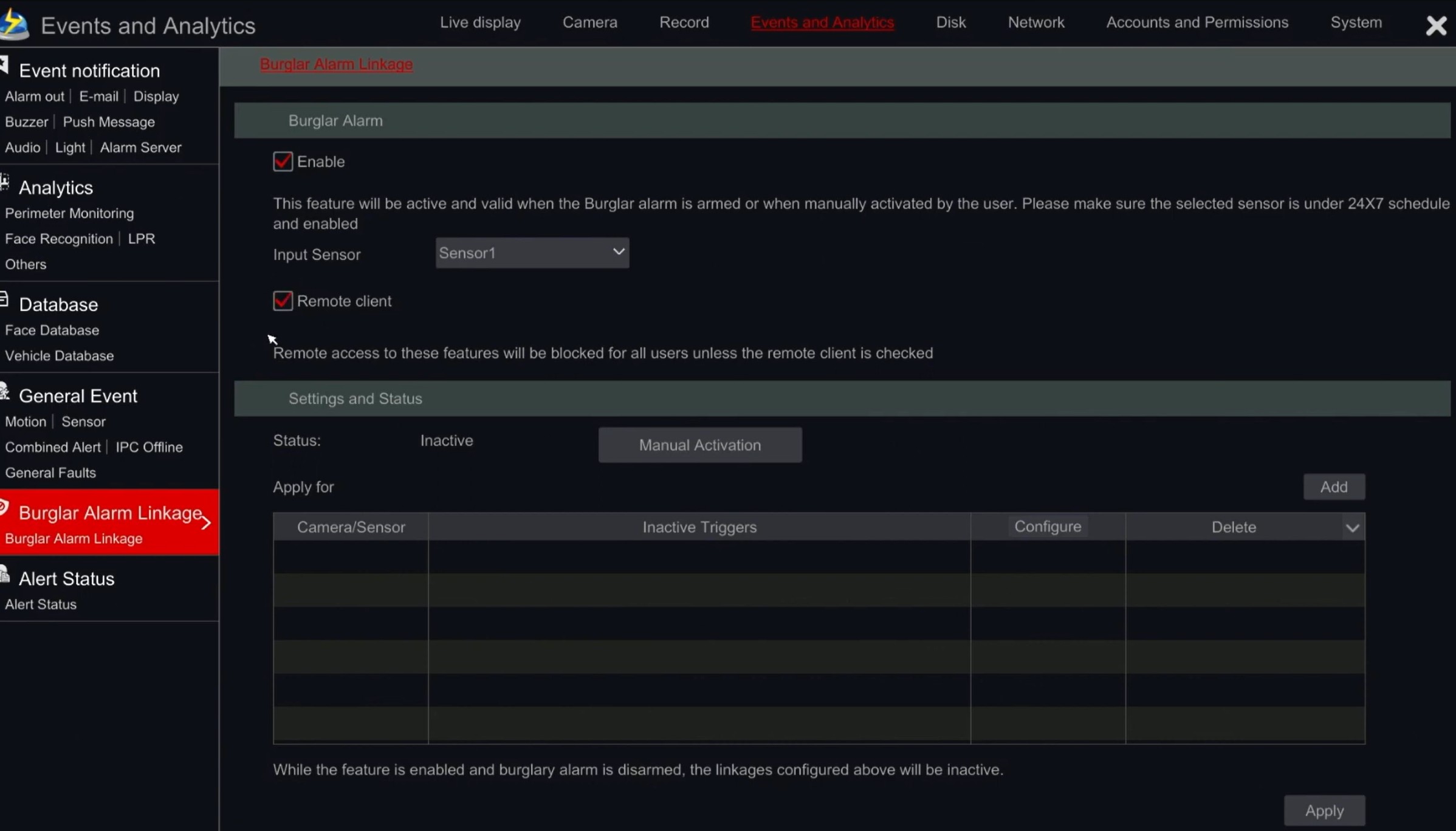
Enable Burglar Alarm Linkage
Burglar Alarm Linkage
Scroll below for instructions how to enable this feature
Burglar Alarm Linkage is used to Arm or Disarm your CCTV System.
By enabling this option we can set the cameras to enable the Sirens, Strobe and Other features of those cameras (if supported)
This setting must be enabled directly on the NVR, it can not be done remotely, via a web page or the APP.
When you enable this setting, Moore Solutions can then assist you in setting up the features remotely.
The Setting you need to enable are
Settings – Events and Analytics – Burlgar Alarm Linkage – Burglar Alarm Linkage
Enable – Ensure this is ticked
Remote Client – Ensure this is ticked
Click Apply.
Note – To enable this feature, you will need to have a Monitor, TV or screen attached to the NVR, and you will also need a mouse to control the menu.
If you dont have a permanent screen and mouse attached, please use any screen and mouse you can borrow, to enable this feature.
Once enabled and saved, we can then proceed remotely configuring the remainder of the settings.